
A huge thank you to everyone very graciously let me know that my dainty pink rose does not show up. It is that “value” thing again. I must say I was pleasantly surprised, though, when my daughter asked me about the photo in question. She said “In your last blog post, you posted a picture of your border and the pink rose at the bottom doesn’t show up. Is it supposed to show up?” I was pleasantly surprised because I didn’t realize she even read my blog! Sweet!
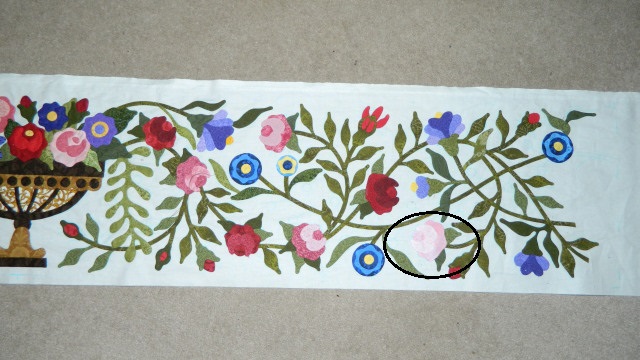
The fabrics I chose for the rose petals are the same “value” as the background. That means there is very little contrast between the rose and the background and so it doesn’t show up very well. How can you tell if your fabrics are the same value or not? Well, I installed an app on my tablet called “Grayscale It”. It changes my color photo…
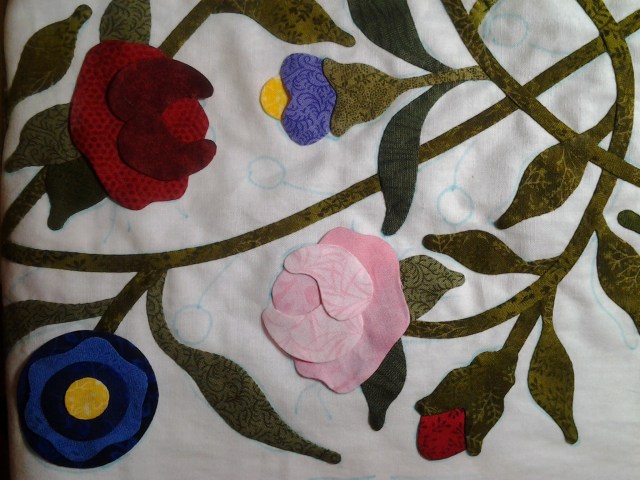
….to black and white. It is so much easier to judge “value” and “contrast” when you can see your fabrics in shades of black, white and gray.

If you take a look at the flower in the bottom left corner, you can see that it is a good example of light, medium and dark. The pink rose is a good example of light, lighter and lightest!! Interesting!
This is the same problem I had with my leaves a couple of posts ago. You can read more about that here.
Who knew that making hexies could be so much fun? I have made 50 (50!) of the pretty flowers and am now onto making the “paths”.

The “path” is the part that creates a white border around each flower. I find this whole process very intriguing!


So I have about 200 more hexagons to prep to complete the path. Yikes!

Til next time…
Kerry
 Simple Bird Applique